Introducing Research Copilot — An AI Lab Partner for Academics
TL;DR
- Research Copilot is an open-source desktop research assistant meant to help you think through ideas, not just generate text.
- It searches Semantic Scholar, arXiv, OpenAlex, and DBLP, deduplicates results, and verifies citations against real search results.
- The app lives in your project folder, can run workspace tools, keeps papers and notes across sessions, and can be extended with project-specific Markdown skills.
GitHub: github.com/daidong/PiPilot | Homepage: daidong.github.io/PiPilot | Install: npm install -g research-copilot && research-copilot
If you've tried the app, feel free to leave your thoughts in the comments below — feedback is very welcome.
It's a Research Assistant, Not a Writing Machine
I've been working on a tool called Research Copilot for the past few months. It started from a simple itch: I wanted something I could talk to about a half-baked research idea — bounce directions off it, have it pull up relevant papers, help me sketch out an argument — without switching between five different apps. Not something that writes for me, but something that helps me think.
It's an open-source desktop app, aimed at PhD students, postdocs, and faculty — basically anyone who does academic research and could use a thinking partner that also happens to know how to search Semantic Scholar, write LaTeX, and run Python.
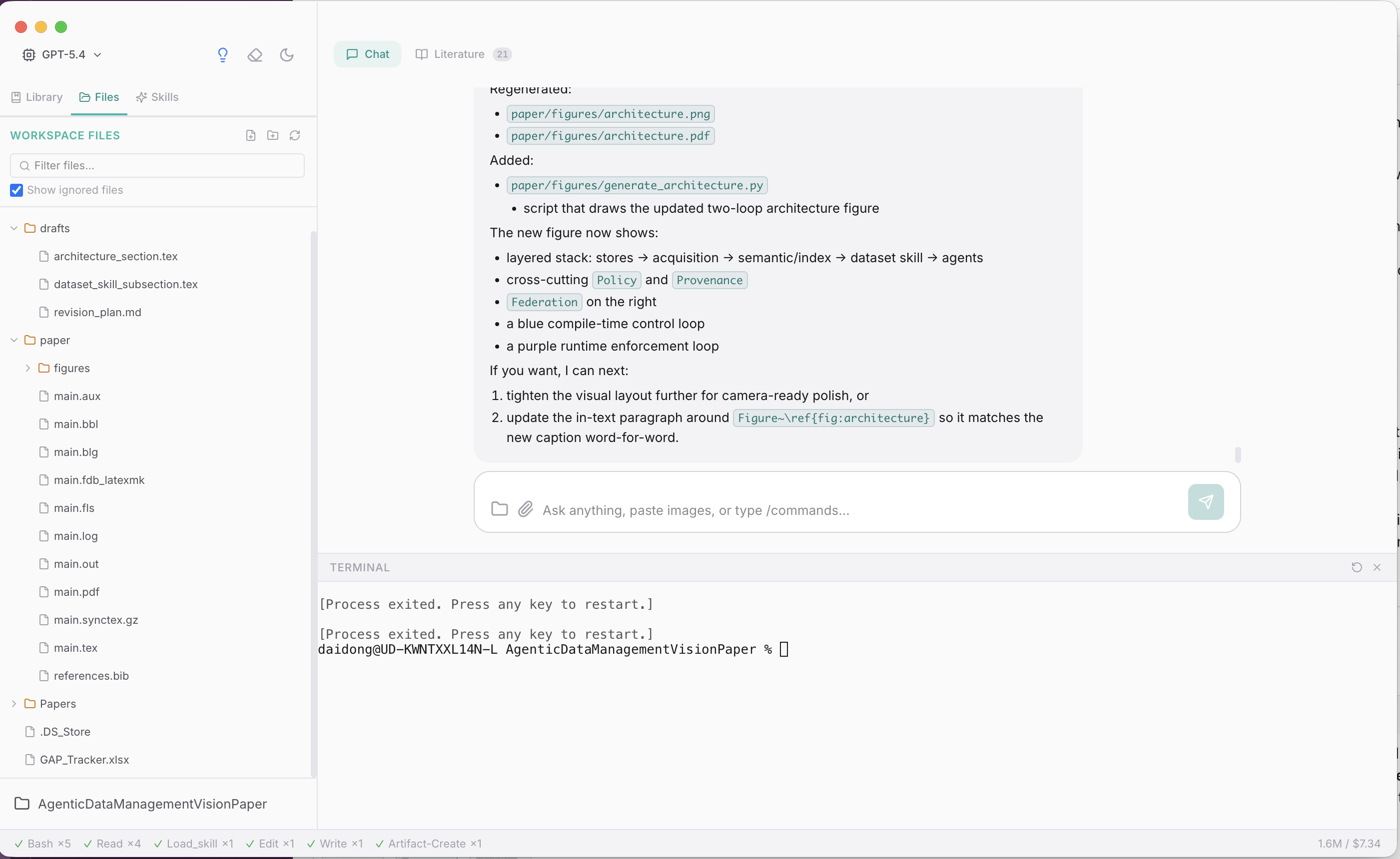
I want to be upfront about what this tool is for. The most useful thing Research Copilot does isn't generating text — it's helping you brainstorm. You can describe a vague idea, and it'll ask clarifying questions, suggest angles you haven't considered, pull up papers that support or challenge your direction, and help you organize scattered thoughts into something coherent. It's the kind of conversation you'd have with a good colleague over coffee, except it can also look things up on the spot.
Of course, it can also help with the grunt work — formatting a paper for a specific venue, generating figures from data, drafting sections when you already know what you want to say. But the core value is having something to think with, not something to offload thinking to.
Literature Search Across Multiple Sources
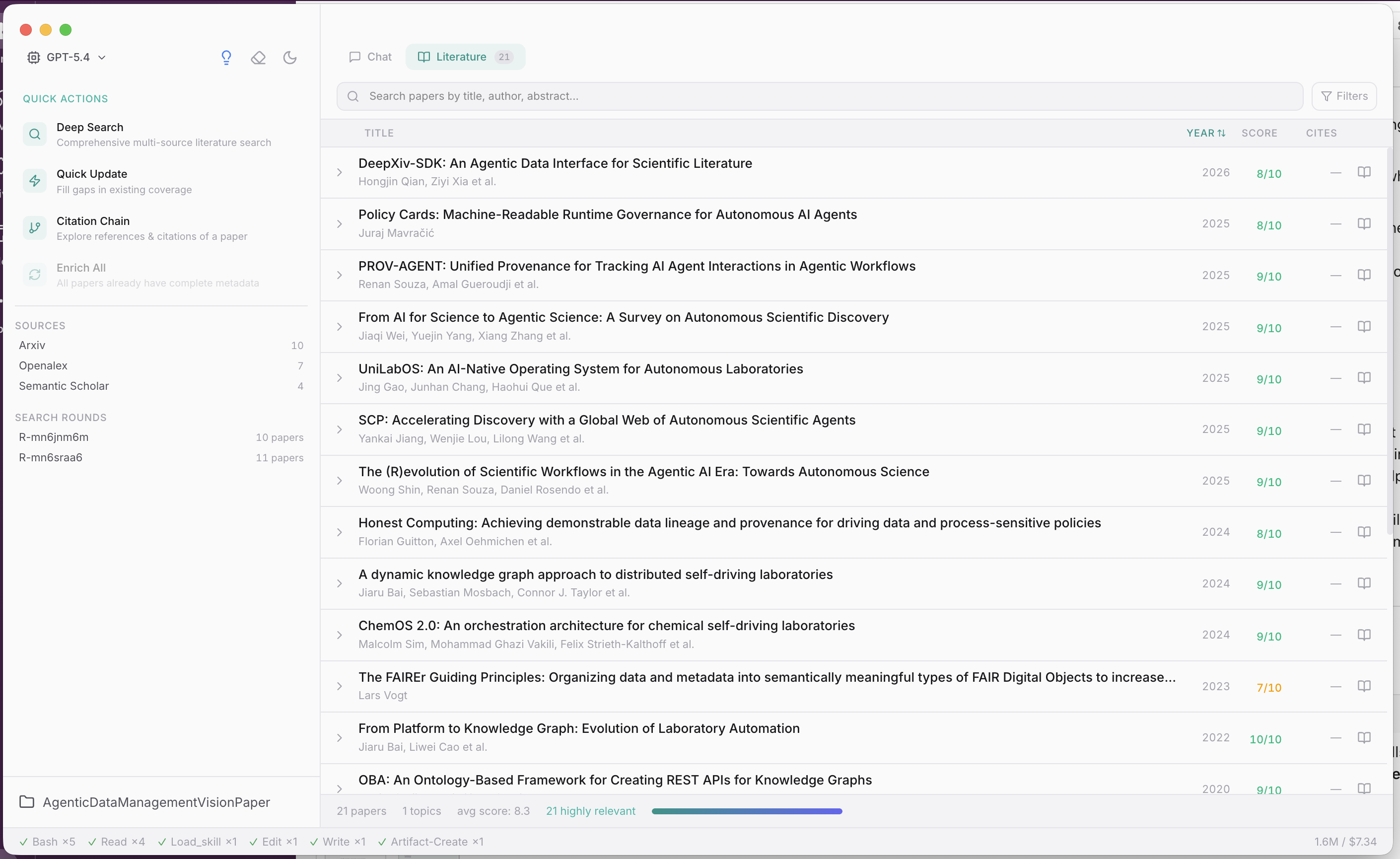
Literature search is where I personally find it most helpful. Instead of hopping between Google Scholar, arXiv, and Semantic Scholar in separate tabs, Research Copilot searches Semantic Scholar, arXiv, OpenAlex, and DBLP at the same time. No API keys needed for any of these academic sources. Results are deduplicated and ranked by relevance, and you can trace citation chains or dig deeper into specific threads from there.
One thing that matters a lot in practice: citations are verified against actual search results, not made up. If you've used ChatGPT to help with a literature review, you probably know the pain of getting confidently cited papers that don't exist. That doesn't happen here.
Built-in Skills You Can Extend
The app ships with 13 skills covering different parts of the research workflow — paper writing, grant proposals (with agency-specific guidance for NSF, NIH, DOE, DARPA, NSTC), data analysis with matplotlib/seaborn, brainstorming, scientific diagrams, and so on. Each skill is just a Markdown file that gets loaded when you need it.
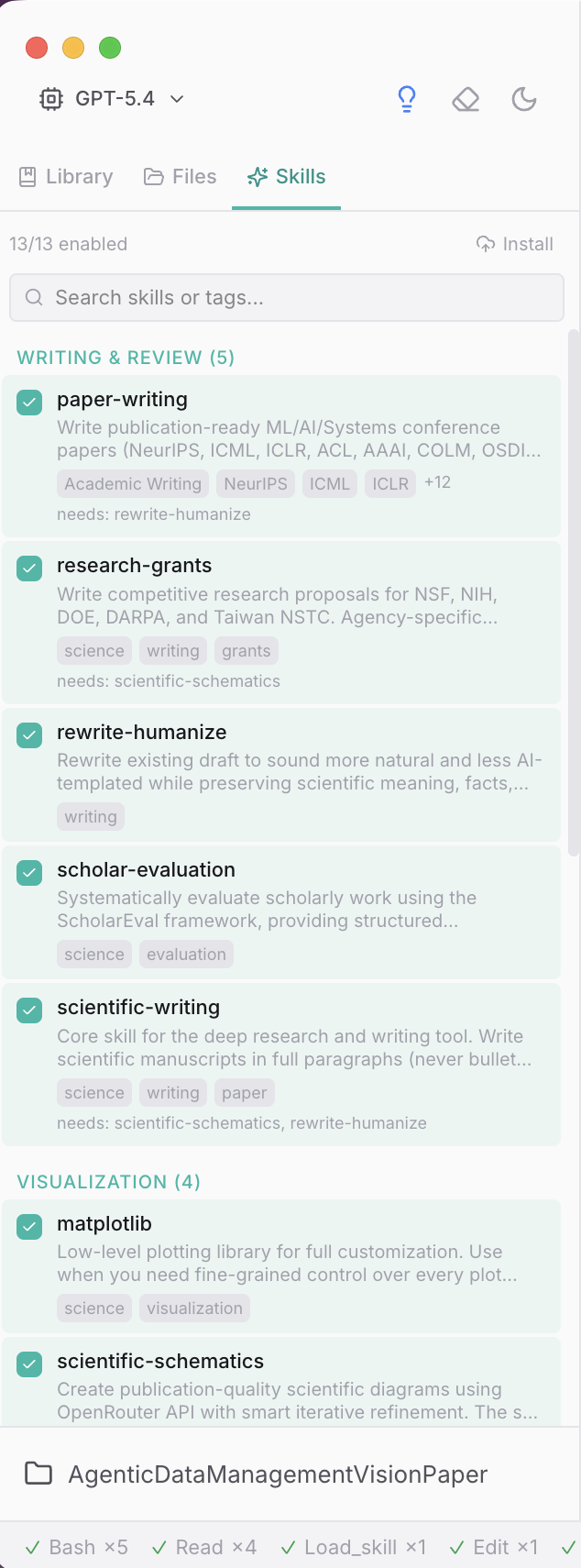
The part I like most about this design: you can write your own. Drop a SKILL.md into your project's .pi/skills/ directory and the app picks it up. I've been using this to add project-specific context — things like "here's how our lab's data pipeline works" or "here are the formatting rules for this particular journal." It turns the assistant from a generic helper into one that actually knows your project.
How It Differs from ChatGPT
I get asked this a lot. The short answer: ChatGPT is a general-purpose conversational AI. Research Copilot is a research assistant that lives in your project folder. It can search real academic databases, verify citations, run Python scripts in your workspace, keep track of papers and notes you've collected, and pick up where you left off across sessions. It's narrower in scope but deeper in the things that matter for academic work.
The bigger difference, though, is in how you use it. You don't just ask it a question and get an answer. You work with it — throw an idea at it, let it push back, refine together, then have it help you execute once the direction is clear. It's closer to pair-programming than to a Q&A bot.
Getting Started
npm install -g research-copilot
research-copilot
Or from source:
git clone https://github.com/daidong/PiPilot.git
cd PiPilot
npm install
npm run dev
You'll need Node.js >= 18 and at least one API key (OpenAI or Anthropic) — the app will ask on first launch. A Brave API key is recommended for web search. All keys are stored locally at ~/.research-copilot/config.json. Python 3 is optional, only needed if you want the data analysis features.
Open Source, MIT Licensed
The whole thing is MIT-licensed and on GitHub. Built with Electron + React + TypeScript. The research agent logic is cleanly separated in lib/, so if you want to understand how it works or adapt it for your own use case, the code is readable.
I'm still actively working on it — there's a lot I want to improve. If you give it a try, I'd genuinely appreciate hearing what works and what doesn't. Leave a comment below or open an issue on GitHub.
Research Copilot — 面向学术研究者的 AI 实验室搭档
GitHub: github.com/daidong/PiPilot | 主页: daidong.github.io/PiPilot | 安装: npm install -g research-copilot && research-copilot
如果你试用了,欢迎在下方评论区留下你的想法和意见。
它是研究助手,不是写作机器
过去几个月我一直在做一个叫 Research Copilot 的工具。最初的想法很简单:我希望有个东西,能让我把一个还没成形的研究想法丢给它聊聊——帮我理方向、拉相关文献、一起把论证框架搭起来——而不用在五六个应用之间来回切。不是替我写,是帮我想。
这是一个开源的桌面应用,面向博士生、博后和高校教师——基本上就是那些做学术研究、偶尔需要一个"能帮忙想问题、顺便还会搜 Semantic Scholar、写 LaTeX、跑 Python"的搭档的人。
我想先说清楚这个工具的定位。Research Copilot 最有用的地方不是生成文本——而是帮你 brainstorm。你可以描述一个模糊的想法,它会追问、提出你没想到的角度、拉出支持或挑战你方向的论文、帮你把零散的思路整理成连贯的东西。有点像跟一个靠谱的同事喝咖啡聊想法,只不过它还能当场帮你查资料。
当然,它也能帮你处理那些琐碎的活儿——按特定会议格式排版论文、用数据生成图表、在你已经想清楚的时候帮你起草段落。但核心价值是有个东西陪你一起想,而不是替你想。
多源文献检索
文献检索是我个人觉得最好用的地方。不用再在 Google Scholar、arXiv、Semantic Scholar 之间来回切了,Research Copilot 会同时检索 Semantic Scholar、arXiv、OpenAlex 和 DBLP。这些学术数据源都不需要 API key。结果会自动去重、按相关性排序,你可以从中追踪引用链或者在某个方向上继续深挖。
有一点在实际使用中很重要:引用都是基于真实检索结果验证的,不是编造的。如果你用过 ChatGPT 做文献综述,大概体会过那种被信誓旦旦地引了一篇根本不存在的论文的痛苦。这里不会发生。
可扩展的内置技能
应用自带 13 个技能,覆盖研究工作流的不同环节——论文写作、基金申请(有针对 NSF、NIH、DOE、DARPA、NSTC 的具体指导)、用 matplotlib/seaborn 做数据分析、brainstorming、科学示意图,等等。每个技能就是一个 Markdown 文件,需要的时候才加载。
这个设计里我最喜欢的一点:你可以自己写技能。在项目的 .pi/skills/ 目录下放一个 SKILL.md,应用就会自动加载。我自己一直在用这个功能添加项目相关的上下文——比如"我们实验室的数据管道是这样的"或者"这个期刊的格式要求是这些"。这样助手就不再是一个通用的帮手,而是一个真正了解你项目的帮手。
和 ChatGPT 的区别
这个问题被问过很多次。简单说:ChatGPT 是一个通用对话 AI。Research Copilot 是一个住在你项目文件夹里的研究助手。它能搜真实的学术数据库、验证引用、在你的工作目录里跑 Python、追踪你收集的论文和笔记、跨 session 记住上下文。范围更窄,但在学术工作需要的地方做得更深。
但更大的区别其实在用法上。你不只是问它一个问题然后等答案。你是跟它一起工作——把想法丢给它,让它反驳,一起打磨,方向清楚了再让它帮你执行。更像是 pair-programming,而不是一个问答机器人。
快速开始
npm install -g research-copilot
research-copilot
或者从源码:
git clone https://github.com/daidong/PiPilot.git
cd PiPilot
npm install
npm run dev
你需要 Node.js >= 18,以及至少一个 API key(OpenAI 或 Anthropic)——首次启动时会要求输入。推荐添加 Brave API key 用于网络搜索。所有 key 存在本地 ~/.research-copilot/config.json。Python 3 可选,只有数据分析功能需要。
开源,MIT 协议
整个项目在 GitHub 上,MIT 协议。技术栈是 Electron + React + TypeScript。研究 agent 的逻辑独立放在 lib/ 目录,如果你想了解它的工作原理或者根据自己的需求改造,代码是好读的。
我还在持续开发——有很多想改进的地方。如果你试用了,真心希望能听到哪里好用、哪里不好用。在下方留言或到 GitHub 提 issue 都行。